AI
Google Turns Gemini Into an AI Coworker: What It Means for Small Businesses
Most of us use AI the same way: you ask a question, it gives an answer, and you do the rest. Google wants to change that. On October 8, 2026, it announced an agentic version of Gemini for businesses, built to take on a whole task, plan it out and work through it, rather than just reply to a prompt.
It is aimed at companies first, with a consumer version promised later. But the ideas behind it will reach small businesses quickly, and they say a lot about where websites and online tools are heading.
What Google announced
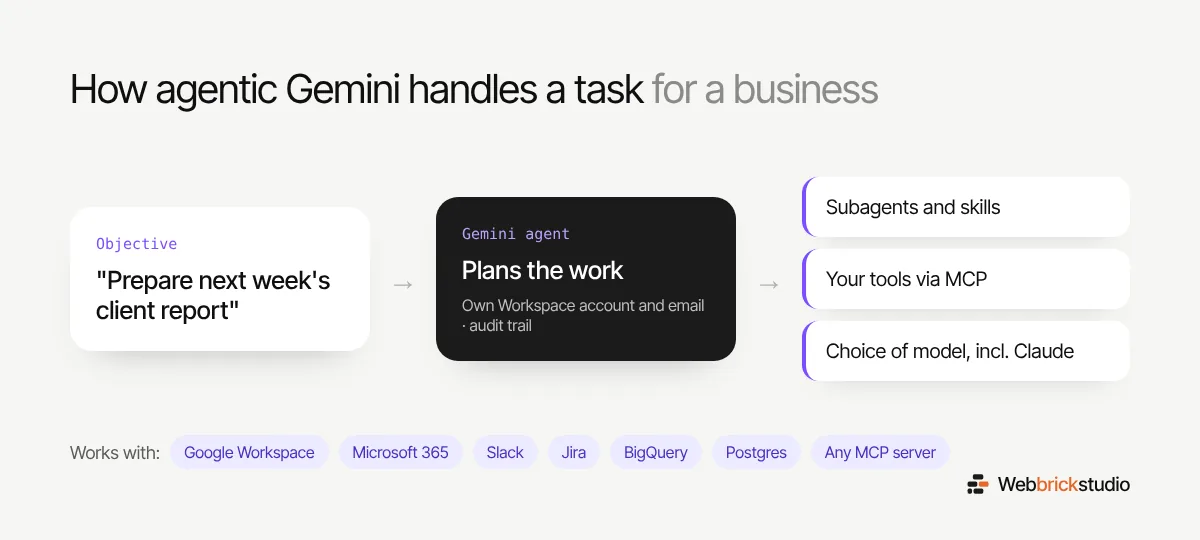
The pitch is simple. You give Gemini an objective, not a list of instructions. It works out the steps, uses the tools and skills it needs, connects to your internal systems, and hands parts of the job to smaller helper agents when that makes sense.
A few details stand out:
- A tasks inbox. You can watch what the agent is doing, including its reasoning, what it delegated and how far along it is.
- It works like a coworker. The agent can have its own Google Workspace account and email address. You can tag it, email it, share files with it or add it to a group chat.
- A clear audit trail. Actions are logged as the agent’s own, not mixed up with a person’s.
- Choice of model. Gemini picks the best model for the job by default, but businesses can choose, including third party models starting with Anthropic’s Claude.
- Lots of connections. Google Workspace, Microsoft 365, Slack, Jira, Confluence, Git, BigQuery, Postgres, Snowflake and more, plus any server that uses the Model Context Protocol (MCP).
It will be available on phones, desktops, the command line and inside tools like Workspace, Microsoft 365, ServiceNow and Slack. Google says early testers include Shopify, PayPal and On. It has not shared pricing yet, but it did mention spending caps and smart routing to keep costs under control.
Why this matters even if you are not an enterprise
It is easy to read “starting with businesses” and assume this is only for large companies. But every big shift in software follows the same path. It starts with enterprise, then becomes a normal feature everyone expects. Think about how online payments or cloud storage spread.
For a small business, a working AI agent could mean things like:
- Pulling last week’s orders, enquiries and ad spend into one client ready report.
- Reading new contact form leads, sorting them and drafting first replies for you to check.
- Keeping product information in sync between your store, your spreadsheet and your marketing tools.
None of that needs a huge team. It needs your tools to be connected, and your data to be in good shape.
The part that affects your website
Here is the bit most people will miss. Agents like this work best with systems they can talk to directly. That is why MCP keeps showing up in announcements from Google, OpenAI, Anthropic and others. It is becoming a standard way for AI to connect with apps and data.
For your website, that means:
- Structured content wins. Clear page structure, schema markup and accurate product data are easier for both search engines and agents to use.
- Forms and data should flow somewhere useful. Leads stuck in an inbox are hard to automate. Leads saved in a proper system can be picked up by an agent.
- Your stack should be modern. Platforms like WordPress and Shopify already offer APIs and growing AI integrations. Outdated plugins and custom code with no API make automation much harder later.
A sensible way to think about it
You do not need to sign up for anything today, and you should be careful with any tool that gets access to your email and customer data. Start small, keep a person reviewing the output, and only connect what the agent truly needs.
What you can do now is make sure your website and tools are ready for this kind of help when it arrives. If you want to know how well your WordPress or Shopify site is set up for AI tools and automation, talk to Web Brick Studio. We will give you a straight answer.